
Build a chapter, and what Update and Replace do
Turn a chapter's beats into prose, and build it again after you change them.
On the Timeline, click a chapter's title row to expand it. The build controls sit in the expanded card.
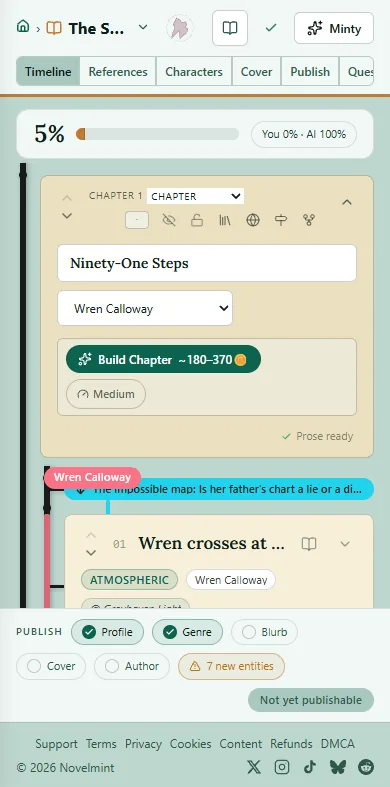
Pick a quality by tapping the pill next to the button: Low, Medium, High or Max. Medium is the default. The cost on the button changes with it, and nothing is spent until you click.
Click Build Chapter. While it runs you'll see which step it's on, and Cancel build.
Read the result with the Beat, Prose and Chapter switch on the same card. Prose shows each beat's text, and Chapter is the whole chapter to read and edit.
After you change beats, build again. The button now offers two modes. Update writes only new or changed beats and keeps everything else, including your own edits. Replace rewrites every beat and overwrites your edits, though the earlier text stays under Versions. Replace starts with one click, so choose it on purpose.

Related
Steps checked against the Studio on November 11, 2026.