
Minty's modes, and what Minty will and won't write
Pick the right kind of help from Minty, and know what she can change in your book.
Click Minty at the top right of any Studio page. On a phone she opens as a sheet over the page; tap Minty again to close it.
Pick a mode with the button under the message box. In a book: Build (the default) plans and changes the book with you; Brainstorm explores ideas; World building works on people, places and rules; Review and Continuity check read and report; Series arc looks across books; Roleplay a character lets you talk with one of your characters; Book covers and Character portraits make pictures; Help answers questions about Novelmint. The same menu has Talk with Minty, one conversation that follows you everywhere, and Librarian, who finds books for you to read.
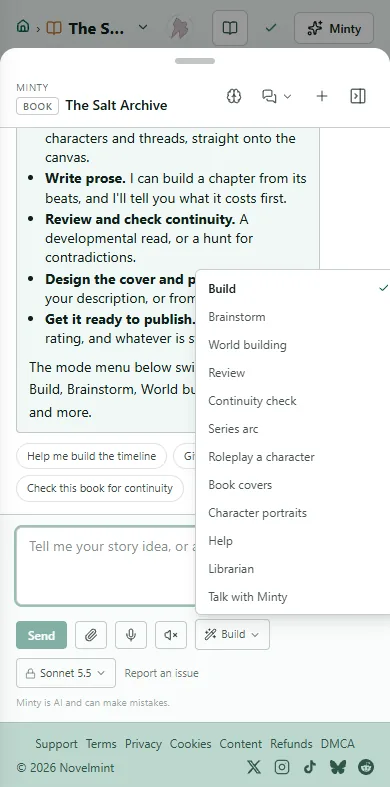
On a series page Minty starts in Series arc, and in your Studio she starts in Ideas, for planning new books.
Minty doesn't write a chapter's prose in chat. Prose comes from building the chapter from its beats, with the cost shown first. In Build she can add and change beats, characters and threads, start a build for you, and make small edits to prose you already have.
She checks with you before she publishes or deletes anything.

Related
Steps checked against the Studio on November 11, 2026.